As you may or may not have noticed my personal website (currently hosted at http://iyou.cyberbotx.com) is down. I'm not sure how long it's going to be down for. Until the real site comes back up you can check out a mirror at: http://iyouboushi.netfirms.com
Unfortunately the mirror has ads that even Firefox's adblock can't remove. But at least the site is up. Most of the files that were being hosted on the site, however, are still down. I went ahead and uploaded a few:
Kaiou Battle Bot Files
Kon, the C# Chatter Bot, Files
The rest will just have to wait until the real site pops back online or I get unlazy enough to upload them all.
Hopefully this outage won't be for long.
Showing posts with label programs. Show all posts
Showing posts with label programs. Show all posts
Sunday, May 3, 2009


Friday, April 24, 2009
Kon version 1.2.0 release
Kon with the Twitter Client is now out!
Version 1.2.0.
Download Binaries: Click here
Downlod Source: Click here (and download all the files)
Version 1.2.0.
- Added the ability for Kon to send messages to Twitter. Right now this uses the LB Brain to construct a random sentence and send it up to a twitter account. You will need to add the following to your config file if you want to use this feature: <usetwitter>true</usetwitter>
<twitterusername>your twitter user name goes here</twitterusername>
<twitterpassword>your twitter password goes here</twitterpassword>
It should send a new message initially upon connecting to the IRC server and again around every hour/hour and a half afterwards - Added a new console command. /TwitterInfo Will display information about the built-in twitter client. This may be expanded in the future.
- Added a new USER-LEVEL command: !twitter The command will return the current twitter status (if twitter client is on and in use).
Download Binaries: Click here
Downlod Source: Click here (and download all the files)
Sunday, April 19, 2009
Kon version 1.2.0 note
Kon is now on Twitter! I'll probably post the binaries to the new version that has the Twitter client built-in as soon as I'm sure it's working correctly.
But yeah! Kon can now connect to Twitter and send a random line that it generates. What's the point of it? Well, no real point other than to say I did it. That and if you ever wanna follow a chatterbot now's your chance to do so. You might see some strange lines. Some may be coherent and others might be downright strange. After all, it's generating completely random lines based on content it has seen in my IRC channel.
I'm waiting for the day Kon generates a "yo dawg!" message and sends it off to Twitter. That'll make my night.
http://twitter.com/konbot
I've got it set so that Kon updates his twitter approximately every hour but I think it's really updating closer to an hour and a half. I'll have to look at that sometime later.
But yeah! Kon can now connect to Twitter and send a random line that it generates. What's the point of it? Well, no real point other than to say I did it. That and if you ever wanna follow a chatterbot now's your chance to do so. You might see some strange lines. Some may be coherent and others might be downright strange. After all, it's generating completely random lines based on content it has seen in my IRC channel.
I'm waiting for the day Kon generates a "yo dawg!" message and sends it off to Twitter. That'll make my night.
http://twitter.com/konbot
I've got it set so that Kon updates his twitter approximately every hour but I think it's really updating closer to an hour and a half. I'll have to look at that sometime later.
Sunday, March 8, 2009
Kon version 1.1.1 release
Another day, another release of Kon.
Version 1.1.1.
Download Binaries: Click here
Downlod Source: Click here (and download all the files)
Version 1.1.1.
- Moved PingControl to its own file.
- Fixed PingControl so that it actually pings the server as intended.
- Added a check that will help check to see if the bot has pinged out and not realized it. If so, it will attempt to reconnect.
- Added <retryattempts>#</retryattempts> to the config file. If you want the bot to attempt to reconnect more than the default 5 times, set it in here.
- Added a new user-level command: !Dinfo Will show a few tidbits of internal info (reconnect attempt/total, if ping control is set to true, and the # of ping attempts so far). Really only useful for myself, but you might find it interesting.
- Changed the reconnect time to three minutes to allow time for ghosts to ping out on the server.
Download Binaries: Click here
Downlod Source: Click here (and download all the files)
Wednesday, January 7, 2009
Kon version 1.1.0 release
I know it's only been a few days since I last released a version of Kon but this update is important. I believe, with the help of Kintora of Esper.net, the reconnect code is working and fixed. It involved a lot of rewriting of Kon's code and adding a whole new thread. That's pretty much all this update includes, so don't look for any improvements on the AI.
I still remind everyone that Kon is not a full IRC client. I'm just trying to get reconnect to work properly so the bot can be left online for a few days without having to restart it manually.
Download Binaries: Click here
Downlod Source: Click here (and download all the files)
I still remind everyone that Kon is not a full IRC client. I'm just trying to get reconnect to work properly so the bot can be left online for a few days without having to restart it manually.
Download Binaries: Click here
Downlod Source: Click here (and download all the files)
Monday, January 5, 2009
Kon version 1.0.11 release
It's the first update of the new year! Happy New Years everyone. May 2009 be good for all.
Now then.
Kon is now version 1.0.11 and has been released. Here's what's new/changed:
The new /SAY, /PART and /JOIN commands are as follows:
As for the reconnect code... well, it SHOULD reconnect now. However, in the event that something goes wrong, it now has a limited number of tries to reconnect. After five attempts it will no longer try to reconnect and will need to be restarted manually. This is to prevent potential errors and potential connect/disconnect flooding to the server.
I'm not sure what the next update of Kon will entail. Maybe trying to improve the way commands are processed and to continue adding more error support. We'll see.
Download Binaries: Click here
Downlod Source: Click here (and download all the files)
Now then.
Kon is now version 1.0.11 and has been released. Here's what's new/changed:
- Fixed a small issue of certain modes not displaying all of the data (such as opping not showing who was opped).
- Changed the logger and display so that it shows which channel the line appears in. I.e. [#channel]
message - Fixed an error that would cause the bot to chop off the ":" in an emoticon if that was the first thing said in a line.
- Added a /CLEAR command to the console. Will clear the window of all text.
- Worked on the reconnect code...again.
- Added a check to stop the bot from reconnecting if it reconnects more than 5 times in a session.
- Added method to handle the appearance of KICK messages.
- Tried to improve how the LB Brain constructs sentences with a topic.
- Fixed another small potential bug with !utter
- Changed the /SAY /PART and /JOIN commands slightly.
The new /SAY, /PART and /JOIN commands are as follows:
- /SAY #channel message will send a message to the channel you specify
- /SAY message will try to send the message to the default channel (the one it joins upon startup)
- /PART #channel will try to leave the channel you specify
- /PART will try to leave the default channel (the one it joins upon startup)
- /JOIN #channel still works the same, just some internal things were changed to help with the changes to the other commands.
As for the reconnect code... well, it SHOULD reconnect now. However, in the event that something goes wrong, it now has a limited number of tries to reconnect. After five attempts it will no longer try to reconnect and will need to be restarted manually. This is to prevent potential errors and potential connect/disconnect flooding to the server.
I'm not sure what the next update of Kon will entail. Maybe trying to improve the way commands are processed and to continue adding more error support. We'll see.
Download Binaries: Click here
Downlod Source: Click here (and download all the files)
Monday, October 20, 2008
Kon version 1.0.10 release
This is a fairly small update with most of it intended to move the bot to towards multiple channel use. Here's the full changelog:
Downlod Source: Click here (and download all the files)
Oh yeah. There's also a README text file in the zip now that explains the various commands and how to set the bot up.
Enjoy!
- Fixed a small potential bug with !utter
- Changed !randomTalk # so that it reflects a message when the % has been changed.
- Changed randomTalk so that setting it to 0 will really shut it off.
- Changed the /join console command so that more than one channel can be joined.
- Changed all commands to display the text in the channel in which the command was used.
- Added a !join #channel command. User level.
- Added a !part #channel command. User level.
- Adjusted many commands to work with multiple channels rather than the defined channel.
Downlod Source: Click here (and download all the files)
Oh yeah. There's also a README text file in the zip now that explains the various commands and how to set the bot up.
Enjoy!
Wednesday, September 24, 2008
Nomad Moogle - Version 1.4
Wow, I never thought I'd be posting another update to this bot, especially after all this time. But here it is!
version 1.4
Added guild points into the crafts list for people to keep track of.
The command to update the amount:
!update guildpoints (character) (amount)
If the amount is 0 or empty (null) it won't show "guild points" on the list.
If you're wondering what happened to version 1.3, I never released it. Why? Who knows? But here's what it added:
version 1.3
Fixed a few minor things.
Added the command: !lookup (char name) (info, jobs, crafts, all)]
it does the same thing as !character lookup but is shorter and easier to remember
Added the command: !character info (char name) [(info, jobs, crafts, all)]
it does the same thing as !character lookup
version 1.4
Added guild points into the crafts list for people to keep track of.
The command to update the amount:
!update guildpoints (character) (amount)
If the amount is 0 or empty (null) it won't show "guild points" on the list.
If you're wondering what happened to version 1.3, I never released it. Why? Who knows? But here's what it added:
version 1.3
Fixed a few minor things.
Added the command: !lookup (char name) (info, jobs, crafts, all)]
it does the same thing as !character lookup but is shorter and easier to remember
Added the command: !character info (char name) [(info, jobs, crafts, all)]
it does the same thing as !character lookup
Friday, August 29, 2008
Idle RPG DS version 0.2, New Game Started
I wasn't originally going to announce the release of this version as it really doesn't add a whole lot to show for the player. But I didn't want people to think that progress wasn't being made towards this game. Admittedly I haven't worked on it as much as I could have (curse you Guitar Hero 3!) but I am working on it at a snail's pace.
Download: version 0.2
In this version..
- Started the "new game" function.
That means the player can click on the 'new game' menu option and it, gasp, works.
- Added the ability to name your character name and the character's class name
Once the player clicks 'new game', a keyboard pops up on the bottom and allows a 25-character player name and a 25-character class name. The class name has no effect on the game itself, just like the IRC version. It's just for looks.
- Added the save function to the game.
After entering the class name it'll save what the player has inputted and kick it back out to the main menu. TO BE ADDED: a "are these names okay?" type question before saving them.
- The main menu will now tell you if there's a game to continue (won't be grayed out)
If the player's card allows FAT, it'll be easy to confirm if the player and class name saved correctly because "Continue" won't be grayed out anymore. The continue option still isn't clickable but at least it'll let people know if it's saved right.
I don't know when the next update will be but it should contain at least the start of the actual game. So until next time.....
Download: version 0.2
In this version..
- Started the "new game" function.
That means the player can click on the 'new game' menu option and it, gasp, works.
- Added the ability to name your character name and the character's class name
Once the player clicks 'new game', a keyboard pops up on the bottom and allows a 25-character player name and a 25-character class name. The class name has no effect on the game itself, just like the IRC version. It's just for looks.
- Added the save function to the game.
After entering the class name it'll save what the player has inputted and kick it back out to the main menu. TO BE ADDED: a "are these names okay?" type question before saving them.
- The main menu will now tell you if there's a game to continue (won't be grayed out)
If the player's card allows FAT, it'll be easy to confirm if the player and class name saved correctly because "Continue" won't be grayed out anymore. The continue option still isn't clickable but at least it'll let people know if it's saved right.
I don't know when the next update will be but it should contain at least the start of the actual game. So until next time.....
Sunday, August 24, 2008
Idle RPG DS version 0.1, The about menu is done!
I decided to start working on the game a little earlier than expected. I wanted to get some of the more basic stuff out of the way and start a menu. I'm kind of proud of the end result considering I've never really touched C before this.
The screens are a little bland but considering the original version of Idle RPG is ran on IRC, which is text only, I don't want to make it too flamboyant. Keeping it simple to pay an homage to the original and to try to keep the size of the game down.

Download: version 0.1
Sorry, no source yet. Probably won't be released for awhile. Especially while in development. We'll see when it's done.
In this version:
+ The title graphic.
+ The main menu
+ The about menu
+ Added the abilty to check for FAT support and display a warning if unable to use it.
That's.. it. More to come when I start working on the actual game engine. I'll start that after I get some questions answered over on PAlib's forums.
Until next time.....
The screens are a little bland but considering the original version of Idle RPG is ran on IRC, which is text only, I don't want to make it too flamboyant. Keeping it simple to pay an homage to the original and to try to keep the size of the game down.
Download: version 0.1
Sorry, no source yet. Probably won't be released for awhile. Especially while in development. We'll see when it's done.
In this version:
+ The title graphic.
+ The main menu
+ The about menu
+ Added the abilty to check for FAT support and display a warning if unable to use it.
That's.. it. More to come when I start working on the actual game engine. I'll start that after I get some questions answered over on PAlib's forums.
Until next time.....
Friday, August 22, 2008
Idle RPG DS
Did you know regular ol people like you and me can write programs to work on the Nintendo DS? Well, while I'm sure some of you know of the "homebrew" scene (as it's called), I have recently installed all of the IDEs and programming tools necessary to actually do it.
My first test of programming on the DS will be with idle RPG. For those who have never heard of it, it's a "game" (loosely) in which you earn experience and level up based on how long you "idle" (don't touch anything). It's popular on IRC chatting networks. Basically if you talk, quit, join, or do anything other than idle you take a penalty and have to wait longer before you level up again. As you level up you find random equipment that enhances your stats and randomly fight other players of the game (the winner gets time taken off his/her amount and the loser gains time).
It's not really exciting but I think this would be a great test of learning how to program on the DS. Such a game would require learning how inputs and outputs work, how to recognize key presses, recognize when the stylus is being used, how to use random functions, etc etc. Everything that would be necessary in a real game.
Planned:
+ Tons of equipment that it can randomly pick from.
+ Stats on top screen, 5 most recent "news" on the bottom screen.
+ The same time penalty for touching any of the buttons and using the stylus as you would via talking and such in the IRC version.
Something I would like to add in a future version (i.e. way down the road):
+ The ability for a ranking/score system. Compare your rank with others.
+ graphic icons for the equipment.
+ maybe a little character running around doing things while the DS is idle.
We'll see how it goes. I'll start coding it next week once I'm done with all the preplanning. You know, assuming Tropical Storm Fay doesn't make Panama City into the next Atlantis.
My first test of programming on the DS will be with idle RPG. For those who have never heard of it, it's a "game" (loosely) in which you earn experience and level up based on how long you "idle" (don't touch anything). It's popular on IRC chatting networks. Basically if you talk, quit, join, or do anything other than idle you take a penalty and have to wait longer before you level up again. As you level up you find random equipment that enhances your stats and randomly fight other players of the game (the winner gets time taken off his/her amount and the loser gains time).
It's not really exciting but I think this would be a great test of learning how to program on the DS. Such a game would require learning how inputs and outputs work, how to recognize key presses, recognize when the stylus is being used, how to use random functions, etc etc. Everything that would be necessary in a real game.
Planned:
+ Tons of equipment that it can randomly pick from.
+ Stats on top screen, 5 most recent "news" on the bottom screen.
+ The same time penalty for touching any of the buttons and using the stylus as you would via talking and such in the IRC version.
Something I would like to add in a future version (i.e. way down the road):
+ The ability for a ranking/score system. Compare your rank with others.
+ graphic icons for the equipment.
+ maybe a little character running around doing things while the DS is idle.
We'll see how it goes. I'll start coding it next week once I'm done with all the preplanning. You know, assuming Tropical Storm Fay doesn't make Panama City into the next Atlantis.
Tuesday, July 15, 2008
Kon version 1.0.9 release
A fairly decent update for the bot.
As previously mentioned, this update changes the way sentences are structured. The topic, if the bot can find one, is now no longer the first word of the sentence. Instead it tries to build a bit of the sentence around it.
Another major change is the way the LB Brain is constructed. With this version it starts a longer depth to try and help with the pure randomness. People who compile Kon can turn off the longer depth and go back to the shorter depth by changing the variable shortDepth in LB.cs to true. The reason I did this is for those larger brain files. The larger the brain file the more random it starts to become. If you increase the depth, however, it should still be random but not to the point of insanity. Unfortunately, there's no way to convert your old brain files over so you'll have to start over.
This update improves the look of IRC in the bot's window including the appearances of: PART, NICK, NOTICE and MODE messages. It also allows the bot to see who joins multiple channels, whereas before it would only show the one channel set to join at start.
The last major advancement for this update is what I call RandomTalk. RandomTalk is exactly what it sounds like: it allows the bot to randomly talk when it's not being addressed. It works on a percentage that's set in the config file. There's also a command that admin and users can use to set it: !randomTalk [#]. By itself (!randomTalk) the bot will tell you what percent it's set at. With a number from 1 to 100 (example: !randomTalk 100) will set the percent to that number. To turn it off set it to -1.
And that's all for this update.
Download Binaries: Click here
Downlod Source: Click here (and download all the files)
As previously mentioned, this update changes the way sentences are structured. The topic, if the bot can find one, is now no longer the first word of the sentence. Instead it tries to build a bit of the sentence around it.
Another major change is the way the LB Brain is constructed. With this version it starts a longer depth to try and help with the pure randomness. People who compile Kon can turn off the longer depth and go back to the shorter depth by changing the variable shortDepth in LB.cs to true. The reason I did this is for those larger brain files. The larger the brain file the more random it starts to become. If you increase the depth, however, it should still be random but not to the point of insanity. Unfortunately, there's no way to convert your old brain files over so you'll have to start over.
This update improves the look of IRC in the bot's window including the appearances of: PART, NICK, NOTICE and MODE messages. It also allows the bot to see who joins multiple channels, whereas before it would only show the one channel set to join at start.
The last major advancement for this update is what I call RandomTalk. RandomTalk is exactly what it sounds like: it allows the bot to randomly talk when it's not being addressed. It works on a percentage that's set in the config file. There's also a command that admin and users can use to set it: !randomTalk [#]. By itself (!randomTalk) the bot will tell you what percent it's set at. With a number from 1 to 100 (example: !randomTalk 100) will set the percent to that number. To turn it off set it to -1.
And that's all for this update.
Download Binaries: Click here
Downlod Source: Click here (and download all the files)
Wednesday, July 9, 2008
Kon version 1.0.9 In Development
It seems like I just can't stop messing with Kon. Even after the release of 1.0.8 six days ago, I've already started development on the next version. Not only that, I've already fixed a bug and improved the sentence development bit of LB Brain.
Thus far:
More to come.
Thus far:
- Fixed a small bug that prevented Kon from seeing the first word in a sentence if it could potentially be a topic of a sentence.
- Changed the way topics are picked so that it randomly chooses one if there's more than one.
- Changed the way topic sentences are constructed. Now Kon tries to build the sentence AROUND the topic, not START the sentence with the topic. This may or may not work as intended.
- Added a little more filtering to LB Brain responses to try and not end up with a lone " or a misplaced ) at the end of sentences.
More to come.
Thursday, July 3, 2008
Kon version 1.0.8 release
Another update to the chatterbot! Hooray!
This update will be rather small compared to the last update. Still, I think it's taken a step forward in the right direction on becoming a much smarter bot.
This version fixes the notorious "null message" bug. In previous versions Kon would cause an error to happen (and potentially crash) when someone typed kon: with no text sent to the bot. This version fixes that and Kon will give a random sentence.
As I mentioned in the last post, Kon's Google Brain was broken and has been fixed to work again. It's not any smarter, nor do I intend to try and make it any smarter, but it's at least working again.
This version also starts two different methods to try and increase Kon's intelligence. First up, a grammar fixing function. This function will attempt to fix certain grammatical mistakes such as changing "am you" to "are you." Right now it doesn't fix a whole lot but hopefully in the future it will.
Second, Kon (when using the LB Brain) will now attempt to try and find a "topic" in what people say to him. Why? Because he tries to build his response around the topic that he finds. Note that this only works with the LB Brain and isn't a true topic finder. Right now it's just seeking for uncommon words. This will hopefully improve as time goes on. There's a new admin and user command, !toggleTopic, that will turn this function on and off.
Finally for this update, I noticed that my LB Brain files were getting to be rather massive in size. Knowing how Kon builds random sentences with this brain I thought I'd write a little utility to try and reorganize the brains and hopefully speed Kon up. Thus the "LB Brain Utility" was born. This small 20KB program comes packed with Kon and, for now, sort the brain files so that all the starting sentences are near the top. For example:
START_SENTENCE Isn't that
another line
another line 2
START_SENTENCE another start
will become
START_SENTENCE Isn't that
START_SENTENCE another start
another line
another line 2
If your LB Brain files get rather large (mine was almost 2MB) it is recommended to run this utility at least once a week. Warning: do not run this program while Kon is actively connected to a channel. Disconnect him first THEN run it. Otherwise there's potential to corrupt the brain files.
And that's all for this update. Enjoy.
Download Binaries: Click here
Downlod Source: Click here (and download all the files)
This update will be rather small compared to the last update. Still, I think it's taken a step forward in the right direction on becoming a much smarter bot.
This version fixes the notorious "null message" bug. In previous versions Kon would cause an error to happen (and potentially crash) when someone typed kon: with no text sent to the bot. This version fixes that and Kon will give a random sentence.
As I mentioned in the last post, Kon's Google Brain was broken and has been fixed to work again. It's not any smarter, nor do I intend to try and make it any smarter, but it's at least working again.
This version also starts two different methods to try and increase Kon's intelligence. First up, a grammar fixing function. This function will attempt to fix certain grammatical mistakes such as changing "am you" to "are you." Right now it doesn't fix a whole lot but hopefully in the future it will.
Second, Kon (when using the LB Brain) will now attempt to try and find a "topic" in what people say to him. Why? Because he tries to build his response around the topic that he finds. Note that this only works with the LB Brain and isn't a true topic finder. Right now it's just seeking for uncommon words. This will hopefully improve as time goes on. There's a new admin and user command, !toggleTopic, that will turn this function on and off.
Finally for this update, I noticed that my LB Brain files were getting to be rather massive in size. Knowing how Kon builds random sentences with this brain I thought I'd write a little utility to try and reorganize the brains and hopefully speed Kon up. Thus the "LB Brain Utility" was born. This small 20KB program comes packed with Kon and, for now, sort the brain files so that all the starting sentences are near the top. For example:
START_SENTENCE Isn't that
another line
another line 2
START_SENTENCE another start
will become
START_SENTENCE Isn't that
START_SENTENCE another start
another line
another line 2
If your LB Brain files get rather large (mine was almost 2MB) it is recommended to run this utility at least once a week. Warning: do not run this program while Kon is actively connected to a channel. Disconnect him first THEN run it. Otherwise there's potential to corrupt the brain files.
And that's all for this update. Enjoy.
Download Binaries: Click here
Downlod Source: Click here (and download all the files)
Tuesday, July 1, 2008
Broken Google Brain
I've become aware that Kon's "Google Brain" is now broken. Apparently something has changed with the way Google returns their results so the current regex pattern is broken. I'm going to fix it and release an update sometime in the near future.
-Edit-
Because I'm not ready to upload the next version just to fix "Google Brain" but still want people to know how to fix it (if they want to use it) I'll post the new regEx pattern here.
 Click to expand to full size
Keep in mind all this does is fix it so that it will work again. It doesn't improve the results any, so the brain is still basically useless. I don't forsee me trying to fix that anytime soon.
-Edit-
Because I'm not ready to upload the next version just to fix "Google Brain" but still want people to know how to fix it (if they want to use it) I'll post the new regEx pattern here.
 Click to expand to full size
Keep in mind all this does is fix it so that it will work again. It doesn't improve the results any, so the brain is still basically useless. I don't forsee me trying to fix that anytime soon.
Thursday, June 5, 2008
Escape from Zearz - Version 1.0.2
Another update!
I have completely recoded the game from scratch yet again because I have found a better method of drawing the graphics to the screen and for storing rooms. The end result is that I can go back to my original idea for directions. The compass is going to disappear, though right now the graphic for it is still present on the GUI. I haven't figure out what I'm going to replace that area with.
No snapshot for this version but if you download it and run it you will see the progress I've made. You can now interact with an NPC ("Ed") and talk to him a few times. He has a few different lines to say.
As of right now I'm borrowing a few sprites and backgrounds from other games. I'm still not completely pleased with it, but it was just meant to test the other stuff anyway. I'll be going back and revamping all of that in a future version.
This will probably be my last post about the game for awhile as the next version will take awhile.
I have completely recoded the game from scratch yet again because I have found a better method of drawing the graphics to the screen and for storing rooms. The end result is that I can go back to my original idea for directions. The compass is going to disappear, though right now the graphic for it is still present on the GUI. I haven't figure out what I'm going to replace that area with.
No snapshot for this version but if you download it and run it you will see the progress I've made. You can now interact with an NPC ("Ed") and talk to him a few times. He has a few different lines to say.
As of right now I'm borrowing a few sprites and backgrounds from other games. I'm still not completely pleased with it, but it was just meant to test the other stuff anyway. I'll be going back and revamping all of that in a future version.
This will probably be my last post about the game for awhile as the next version will take awhile.
Monday, June 2, 2008
Escape from Zearz - Version 1.0.1
So far so good. I haven't dropped the project, though all the work I did today on it really made me wish I could.
I had to change the GUI interface a little bit due to some serious complications I was having with some of my code. I also decided I really don't want to try and mess with a graphical inventory system for my first game. The complexity of that would be extreme for my first time so I'll stick to a text one.
As a result, the new GUI looks like this:

I had to change the GUI interface a little bit due to some serious complications I was having with some of my code. I also decided I really don't want to try and mess with a graphical inventory system for my first game. The complexity of that would be extreme for my first time so I'll stick to a text one.
As a result, the new GUI looks like this:

I'm fairly certain all of the GUI stuff is set. I also added the updater that I've used in three programs now so that the users can check for updates. It's under help->Check for updates.
Now I need to work on actually writing the game and getting interactive objects/puzzles in there.
Download Link
http://iyou.cyberbotx.com/programs/C-sharp/EscapeFromZears/
You can find all the various versions there. Keep in mind that until I've made mention of it, none of these are "official" demos and are just works in progress. You may not be able to get far into the game, if anywhere. Download and run at your own risk.
Now I need to work on actually writing the game and getting interactive objects/puzzles in there.
Download Link
http://iyou.cyberbotx.com/programs/C-sharp/EscapeFromZears/
You can find all the various versions there. Keep in mind that until I've made mention of it, none of these are "official" demos and are just works in progress. You may not be able to get far into the game, if anywhere. Download and run at your own risk.
Friday, May 30, 2008
Escape from Zearz
What happens when Iyou has played too many SCUMM games and gets really bored? A new creation!
I think I have officially abandoned The Kingdom of Crim, though I may one day pick it back up. Instead I've decided to make a SCUMM-ish type game called "Escape from Zearz."
For those who have never heard of SCUMM (what, have you lived under a rock?), it's a scripting language used by LucasArts to create such games as Maniac Mansion, Zak McKracken, the Monkey Island series and countless other games. All of them are considered classics and some of the best adventure games ever created.
Will my game even come close to that? Probably not. I'm not really trying to make a game on par with LucasArts and this is merely a learning tool for me. Still, I would like it to be somewhat fun and playable. That's my overall goal.
As of right now the title and the basic GUI screens are completed. I am borrowing the look of the GUI from the Indiana Jones SCUMM game for the moment. I suppose this really makes it more complicated than it needs to be, since I could use the later Monkey Island series style and limit myself to fewer verbs and commands, but what's life without challenges?
Here's a sample image:

With luck I won't completely drop this project and a playable demo will be out in the next few months. So stay tuned and hope for the best!
I think I have officially abandoned The Kingdom of Crim, though I may one day pick it back up. Instead I've decided to make a SCUMM-ish type game called "Escape from Zearz."
For those who have never heard of SCUMM (what, have you lived under a rock?), it's a scripting language used by LucasArts to create such games as Maniac Mansion, Zak McKracken, the Monkey Island series and countless other games. All of them are considered classics and some of the best adventure games ever created.
Will my game even come close to that? Probably not. I'm not really trying to make a game on par with LucasArts and this is merely a learning tool for me. Still, I would like it to be somewhat fun and playable. That's my overall goal.
As of right now the title and the basic GUI screens are completed. I am borrowing the look of the GUI from the Indiana Jones SCUMM game for the moment. I suppose this really makes it more complicated than it needs to be, since I could use the later Monkey Island series style and limit myself to fewer verbs and commands, but what's life without challenges?
Here's a sample image:

With luck I won't completely drop this project and a playable demo will be out in the next few months. So stay tuned and hope for the best!
Tuesday, May 27, 2008
Kon version 1.0.7 release
The last time I touched Kon was back on Feb 28th. When I had closed down the IDE that final time I thought that it was probably the closest that I'd ever come to being able to make Kon "learn." To be honest, that feeling hasn't wavered all that much, but I have found ways to improve and enhance Kon since then.
First up are bug fixes. After having run Kon for a few weeks observing I've noticed a few major bugs that have popped up. Two of which caused the bot to go BOOM. I also discovered that it wasn't replacing "UNNAMED_USER" correctly with someone from the channel. That has since been fixed. Also fixed: when a user used to talk to Kon in query he would respond in channel. Now he responds in query to queries.
Another thing I really wanted to get done with the last version but got tired before finishing was separating commands into three types: admin, users, and everyone. This version has achieved this. There's one admin that must be set, then the admin can add multiple users. All of the commands have been split into one of those three categories.
One last thing I've done was go back and redo the LB brain so that it splits questions and all other lines ("statements") into separate files. If the user asks Kon a question he will ALWAYS respond with a statement. Otherwise, it will be a 50/50 shot on which one he'll do. It's not a huge change, but it might make things a little easier in the future should I choose to pursue other ideas I have.
Download Binaries: Click here
Downlod Source: Click here (and download all the files)
Complete changelog:
First up are bug fixes. After having run Kon for a few weeks observing I've noticed a few major bugs that have popped up. Two of which caused the bot to go BOOM. I also discovered that it wasn't replacing "UNNAMED_USER" correctly with someone from the channel. That has since been fixed. Also fixed: when a user used to talk to Kon in query he would respond in channel. Now he responds in query to queries.
Another thing I really wanted to get done with the last version but got tired before finishing was separating commands into three types: admin, users, and everyone. This version has achieved this. There's one admin that must be set, then the admin can add multiple users. All of the commands have been split into one of those three categories.
One last thing I've done was go back and redo the LB brain so that it splits questions and all other lines ("statements") into separate files. If the user asks Kon a question he will ALWAYS respond with a statement. Otherwise, it will be a 50/50 shot on which one he'll do. It's not a huge change, but it might make things a little easier in the future should I choose to pursue other ideas I have.
Download Binaries: Click here
Downlod Source: Click here (and download all the files)
Complete changelog:
- Fixed an error when you toggle the LB brain off that caused the bot to crash.
- Fixed an error with !LBinfo when the LB brain wasn't loaded.
- Tried to fix the reconnect command, again.
- Seperated the IncomingCommand method into its own file.
- Seperated the ConsoleCommand method into its own file.
- Seperated the logging method into its own file.
- Added !konInfo to the list of commands. This will send the version information to the channel.
- Changed the way the LB brain works by seperating questions and statements. Now when someone asks a question to the bot, it will reply with a statement (a non-question). Otherwise, it'll be random whether or not it asks a question or replies with a statement.
- Fixed a channel user list bug that wasn't showing the list of channel users after someone talked to the bot for the first time.
- Added a !channelusers command that will display all the users in the channel (for testing purposes) ** warning: don't use this command in an extremely busy channel with a ton of users (more than 30) or else it might crash the bot.
- Added an !utter command that will Kon to randomly say something to the channel.
- Added an admin section to the config file.
Admins have access to all commands and have the ability to add 'users' to the list. - Commands have been broken down by type: admin only, users, anyone.
- Fixed a bug in previous versions where Kon would spout two responses for one input line.
- Fixed a bug that caused Kon to reply to the main channel when someone messaged him in private. Now he will respond to private messages by messaging the person who is talking to him.
- ADMIN ONLY commands: !addUser (nick), !remUser (nick), !quit
- ADMIN AND USERS ONLY commands: !reload, !reloadAIML, !toggleAIML, !toggleGoogle, !toggleLB, !channelUsers, !utter
- ANYONE commands: !splash, !konInfo, !brainInfo, !LBinfo
Thursday, May 8, 2008
Clam Digger - Version 1.0
"Oh, you gonna love this boy. Tyrone calls you up, you know - in the game - and he says 'I can dig more clams than you, stupid!' And you gotta say 'Nuh-uh, boy,' And y'all gotta race down to the beach with your buckets and your shovels, and the object of the game...is to find parking."- Meatwad, ATHF
During my time spent on FFXI I've yet to find such a peaceful and relaxing hobby as clamming is. The area is just beautiful and it's a very nice break from farming and leveling. Of course clamming involves keeping track of your bucket weight and making sure you don't go too far over. This program is designed to help with that.
There are several online tools that do the exact same thing. One of which, "The Clamming Kit" (http://ffxi.lokyst.net/clammer/clamming.html) has been my inspiration in making this program. So now you're asking why you should be using this program instead of the online ones. Well, my program not only keeps track of the weight but also the value in gil that your current bucket is worth.
This means that you can assess your risk in trying to dig up another item as you get closer and closer to your bucket weight cap. If you're at 43/50 for example and your bucket is only worth 42 gil you might want to take the risk. However, if your bucket is at 43/50 and is worth 1700 gil you will obviously not want to take the risk.
I hope that you will find this program useful during your relaxing clamming time.
Version 1.0
Download
Screenshot
** Note: this program does require Microsoft's .NET Framework version 2.0 or higher.
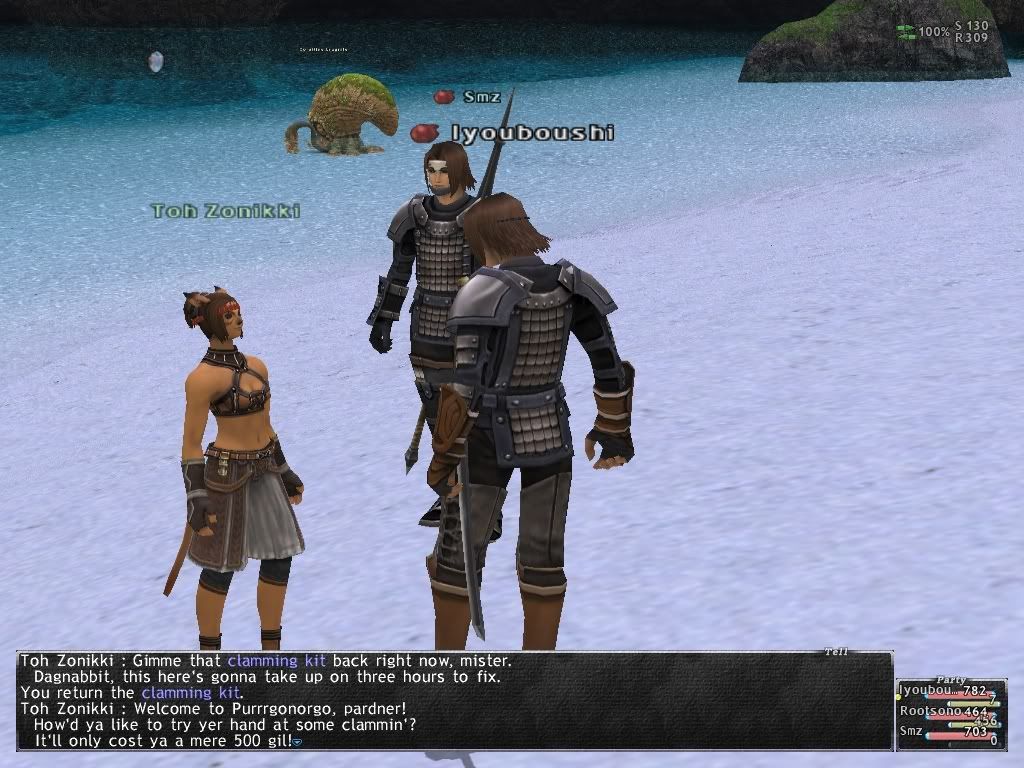 Don't let this happen to you! Use this program!
Subscribe to:
Posts (Atom)


