Another update!
I have completely recoded the game from scratch yet again because I have found a better method of drawing the graphics to the screen and for storing rooms. The end result is that I can go back to my original idea for directions. The compass is going to disappear, though right now the graphic for it is still present on the GUI. I haven't figure out what I'm going to replace that area with.
No snapshot for this version but if you download it and run it you will see the progress I've made. You can now interact with an NPC ("Ed") and talk to him a few times. He has a few different lines to say.
As of right now I'm borrowing a few sprites and backgrounds from other games. I'm still not completely pleased with it, but it was just meant to test the other stuff anyway. I'll be going back and revamping all of that in a future version.
This will probably be my last post about the game for awhile as the next version will take awhile.
Thursday, June 5, 2008


Monday, June 2, 2008
Escape from Zearz - Version 1.0.1
So far so good. I haven't dropped the project, though all the work I did today on it really made me wish I could.
I had to change the GUI interface a little bit due to some serious complications I was having with some of my code. I also decided I really don't want to try and mess with a graphical inventory system for my first game. The complexity of that would be extreme for my first time so I'll stick to a text one.
As a result, the new GUI looks like this:

I had to change the GUI interface a little bit due to some serious complications I was having with some of my code. I also decided I really don't want to try and mess with a graphical inventory system for my first game. The complexity of that would be extreme for my first time so I'll stick to a text one.
As a result, the new GUI looks like this:

I'm fairly certain all of the GUI stuff is set. I also added the updater that I've used in three programs now so that the users can check for updates. It's under help->Check for updates.
Now I need to work on actually writing the game and getting interactive objects/puzzles in there.
Download Link
http://iyou.cyberbotx.com/programs/C-sharp/EscapeFromZears/
You can find all the various versions there. Keep in mind that until I've made mention of it, none of these are "official" demos and are just works in progress. You may not be able to get far into the game, if anywhere. Download and run at your own risk.
Now I need to work on actually writing the game and getting interactive objects/puzzles in there.
Download Link
http://iyou.cyberbotx.com/programs/C-sharp/EscapeFromZears/
You can find all the various versions there. Keep in mind that until I've made mention of it, none of these are "official" demos and are just works in progress. You may not be able to get far into the game, if anywhere. Download and run at your own risk.
Friday, May 30, 2008
Escape from Zearz
What happens when Iyou has played too many SCUMM games and gets really bored? A new creation!
I think I have officially abandoned The Kingdom of Crim, though I may one day pick it back up. Instead I've decided to make a SCUMM-ish type game called "Escape from Zearz."
For those who have never heard of SCUMM (what, have you lived under a rock?), it's a scripting language used by LucasArts to create such games as Maniac Mansion, Zak McKracken, the Monkey Island series and countless other games. All of them are considered classics and some of the best adventure games ever created.
Will my game even come close to that? Probably not. I'm not really trying to make a game on par with LucasArts and this is merely a learning tool for me. Still, I would like it to be somewhat fun and playable. That's my overall goal.
As of right now the title and the basic GUI screens are completed. I am borrowing the look of the GUI from the Indiana Jones SCUMM game for the moment. I suppose this really makes it more complicated than it needs to be, since I could use the later Monkey Island series style and limit myself to fewer verbs and commands, but what's life without challenges?
Here's a sample image:

With luck I won't completely drop this project and a playable demo will be out in the next few months. So stay tuned and hope for the best!
I think I have officially abandoned The Kingdom of Crim, though I may one day pick it back up. Instead I've decided to make a SCUMM-ish type game called "Escape from Zearz."
For those who have never heard of SCUMM (what, have you lived under a rock?), it's a scripting language used by LucasArts to create such games as Maniac Mansion, Zak McKracken, the Monkey Island series and countless other games. All of them are considered classics and some of the best adventure games ever created.
Will my game even come close to that? Probably not. I'm not really trying to make a game on par with LucasArts and this is merely a learning tool for me. Still, I would like it to be somewhat fun and playable. That's my overall goal.
As of right now the title and the basic GUI screens are completed. I am borrowing the look of the GUI from the Indiana Jones SCUMM game for the moment. I suppose this really makes it more complicated than it needs to be, since I could use the later Monkey Island series style and limit myself to fewer verbs and commands, but what's life without challenges?
Here's a sample image:

With luck I won't completely drop this project and a playable demo will be out in the next few months. So stay tuned and hope for the best!
Tuesday, May 27, 2008
Kon version 1.0.7 release
The last time I touched Kon was back on Feb 28th. When I had closed down the IDE that final time I thought that it was probably the closest that I'd ever come to being able to make Kon "learn." To be honest, that feeling hasn't wavered all that much, but I have found ways to improve and enhance Kon since then.
First up are bug fixes. After having run Kon for a few weeks observing I've noticed a few major bugs that have popped up. Two of which caused the bot to go BOOM. I also discovered that it wasn't replacing "UNNAMED_USER" correctly with someone from the channel. That has since been fixed. Also fixed: when a user used to talk to Kon in query he would respond in channel. Now he responds in query to queries.
Another thing I really wanted to get done with the last version but got tired before finishing was separating commands into three types: admin, users, and everyone. This version has achieved this. There's one admin that must be set, then the admin can add multiple users. All of the commands have been split into one of those three categories.
One last thing I've done was go back and redo the LB brain so that it splits questions and all other lines ("statements") into separate files. If the user asks Kon a question he will ALWAYS respond with a statement. Otherwise, it will be a 50/50 shot on which one he'll do. It's not a huge change, but it might make things a little easier in the future should I choose to pursue other ideas I have.
Download Binaries: Click here
Downlod Source: Click here (and download all the files)
Complete changelog:
First up are bug fixes. After having run Kon for a few weeks observing I've noticed a few major bugs that have popped up. Two of which caused the bot to go BOOM. I also discovered that it wasn't replacing "UNNAMED_USER" correctly with someone from the channel. That has since been fixed. Also fixed: when a user used to talk to Kon in query he would respond in channel. Now he responds in query to queries.
Another thing I really wanted to get done with the last version but got tired before finishing was separating commands into three types: admin, users, and everyone. This version has achieved this. There's one admin that must be set, then the admin can add multiple users. All of the commands have been split into one of those three categories.
One last thing I've done was go back and redo the LB brain so that it splits questions and all other lines ("statements") into separate files. If the user asks Kon a question he will ALWAYS respond with a statement. Otherwise, it will be a 50/50 shot on which one he'll do. It's not a huge change, but it might make things a little easier in the future should I choose to pursue other ideas I have.
Download Binaries: Click here
Downlod Source: Click here (and download all the files)
Complete changelog:
- Fixed an error when you toggle the LB brain off that caused the bot to crash.
- Fixed an error with !LBinfo when the LB brain wasn't loaded.
- Tried to fix the reconnect command, again.
- Seperated the IncomingCommand method into its own file.
- Seperated the ConsoleCommand method into its own file.
- Seperated the logging method into its own file.
- Added !konInfo to the list of commands. This will send the version information to the channel.
- Changed the way the LB brain works by seperating questions and statements. Now when someone asks a question to the bot, it will reply with a statement (a non-question). Otherwise, it'll be random whether or not it asks a question or replies with a statement.
- Fixed a channel user list bug that wasn't showing the list of channel users after someone talked to the bot for the first time.
- Added a !channelusers command that will display all the users in the channel (for testing purposes) ** warning: don't use this command in an extremely busy channel with a ton of users (more than 30) or else it might crash the bot.
- Added an !utter command that will Kon to randomly say something to the channel.
- Added an admin section to the config file.
Admins have access to all commands and have the ability to add 'users' to the list. - Commands have been broken down by type: admin only, users, anyone.
- Fixed a bug in previous versions where Kon would spout two responses for one input line.
- Fixed a bug that caused Kon to reply to the main channel when someone messaged him in private. Now he will respond to private messages by messaging the person who is talking to him.
- ADMIN ONLY commands: !addUser (nick), !remUser (nick), !quit
- ADMIN AND USERS ONLY commands: !reload, !reloadAIML, !toggleAIML, !toggleGoogle, !toggleLB, !channelUsers, !utter
- ANYONE commands: !splash, !konInfo, !brainInfo, !LBinfo
Thursday, May 8, 2008
Clam Digger - Version 1.0
"Oh, you gonna love this boy. Tyrone calls you up, you know - in the game - and he says 'I can dig more clams than you, stupid!' And you gotta say 'Nuh-uh, boy,' And y'all gotta race down to the beach with your buckets and your shovels, and the object of the game...is to find parking."- Meatwad, ATHF
During my time spent on FFXI I've yet to find such a peaceful and relaxing hobby as clamming is. The area is just beautiful and it's a very nice break from farming and leveling. Of course clamming involves keeping track of your bucket weight and making sure you don't go too far over. This program is designed to help with that.
There are several online tools that do the exact same thing. One of which, "The Clamming Kit" (http://ffxi.lokyst.net/clammer/clamming.html) has been my inspiration in making this program. So now you're asking why you should be using this program instead of the online ones. Well, my program not only keeps track of the weight but also the value in gil that your current bucket is worth.
This means that you can assess your risk in trying to dig up another item as you get closer and closer to your bucket weight cap. If you're at 43/50 for example and your bucket is only worth 42 gil you might want to take the risk. However, if your bucket is at 43/50 and is worth 1700 gil you will obviously not want to take the risk.
I hope that you will find this program useful during your relaxing clamming time.
Version 1.0
Download
Screenshot
** Note: this program does require Microsoft's .NET Framework version 2.0 or higher.
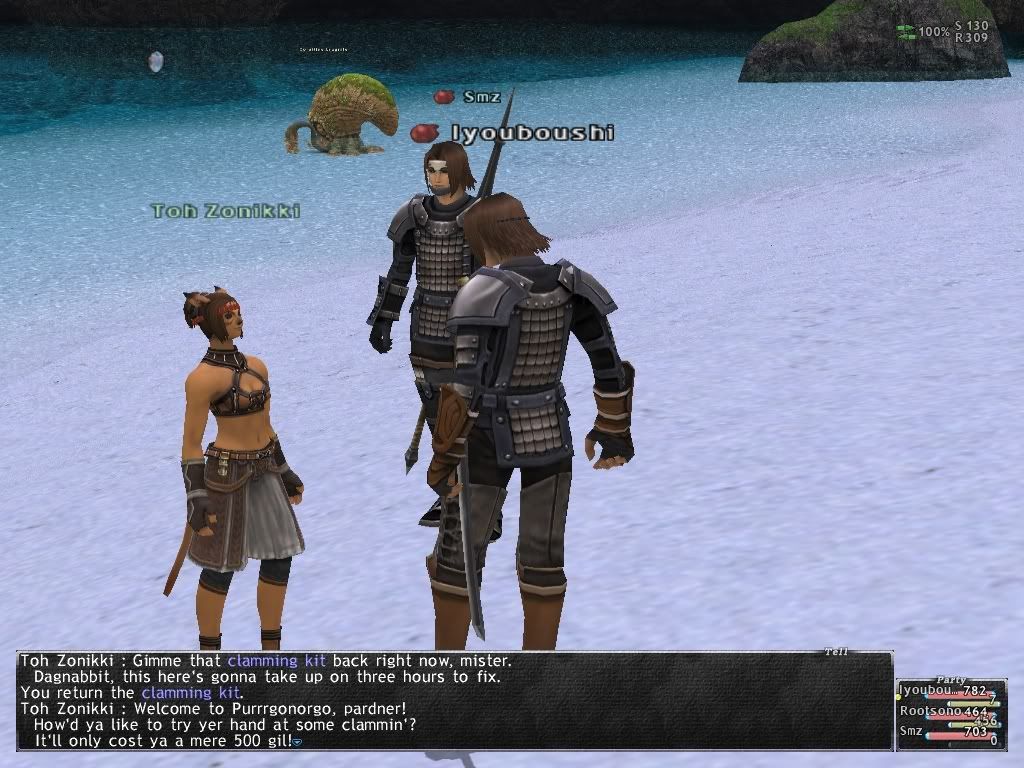 Don't let this happen to you! Use this program!
Friday, April 11, 2008
Nomad Moogle - Version 1.2
Another quick update to the program. I forgot to mention version 1.1 here, so I'll go ahead and mention what it does in addition to version 1.2.
Download link
version 1.1
I went back and edited the commands to make them channel only (you can only use them in channels). I also changed the way !character lookup works, slightly.
The new command for it is:
!character lookup (character name) [(info, jobs, crafts, all)]
If you don't use any of the parameters after the character's name, it will display all the information about that character (info, jobs and crafts). Else you can specify what you want to know. There's also !character info and !check character that work exactly the same way.
version 1.2
You can now link multiple nicks to one character. This is handy if you use multiple nicks on IRC (like a few of my LS mates) and would like to be able to update your character with any of them.
The new command for it is:
!link (check, add, remove) (char name) [(nick to add/remove)]
!link check (character) will display all the nicks that are currently linked to that character.
[01:30] Iyouboushi> !link check Iyouboushi
[01:30] Moogle> [Names linked to Iyouboushi: Iyouboushi, Kiisuke]
You can add as many nicks as you want (or at least as many as mIRC will still process) but you must have at least 1 linked to the character. Oh and I also made sure Goldsmithing was showing up on the list (previously it wasn't).
The only thing that I really have left for a future version is a search command. Well, and maybe adding in some of the other skills (combat, magic, etc). Otherwise, I think I'm finished with it. :)
Download link
version 1.1
I went back and edited the commands to make them channel only (you can only use them in channels). I also changed the way !character lookup works, slightly.
The new command for it is:
!character lookup (character name) [(info, jobs, crafts, all)]
If you don't use any of the parameters after the character's name, it will display all the information about that character (info, jobs and crafts). Else you can specify what you want to know. There's also !character info and !check character that work exactly the same way.
version 1.2
You can now link multiple nicks to one character. This is handy if you use multiple nicks on IRC (like a few of my LS mates) and would like to be able to update your character with any of them.
The new command for it is:
!link (check, add, remove) (char name) [(nick to add/remove)]
!link check (character) will display all the nicks that are currently linked to that character.
[01:30] Iyouboushi> !link check Iyouboushi
[01:30] Moogle> [Names linked to Iyouboushi: Iyouboushi, Kiisuke]
You can add as many nicks as you want (or at least as many as mIRC will still process) but you must have at least 1 linked to the character. Oh and I also made sure Goldsmithing was showing up on the list (previously it wasn't).
The only thing that I really have left for a future version is a search command. Well, and maybe adding in some of the other skills (combat, magic, etc). Otherwise, I think I'm finished with it. :)
Tuesday, April 1, 2008
Nomad Moogle - Version 1.0
A few days ago I had an idea for a new bot: an FFXI character tracker. Kinthoras of Esper.net and I talked it over and he decided to create one in Java. I decided to create my own, based on his Java bot, in mIRC's internal scripting language. I have just finished my first version and it does everything his does except searching (and that may be forthcoming in a future version).
Current commands:
!help
Displays this list in a private message
!stoneskin [enhancing/BLU skill level] [MND]
A Stoneskin/Metallic Body calculator that shows how much it will absorb
!create character [name]
Creates a character
!delete character [name]
Deletes a character you have created (cannot erase other people's characters**note they are GONE after you use this command. There is no retrieval)
!update job [character name] [job] [level]
Updates a character's job
!update craft [character name] [craft] [level]
Updates a character's craft
!update race [character name] [race]
Set a character's race
!update gender [character name] [male/female]
Set a character's gender
!update nation [character name] [nation]
Set a character's home nation
!update rank [character name] [rank]
Set a character's rank
!character lookup [name]
Display's a character's info
Where do you download this beauty you crazy FFXI/mIRC addicts? You can download it by clicking here. The loading information is inside the file itself as well as a command list. If you are unfamiliar with loading mIRC scripts, it's best to create a seperate folder (C:\moogle\ or C:\ffxi\ will work) with a copy of mIRC in the folder (version 6.16 or greater should work just fine). Once you do that, unzip the .mrc file in that folder, load mIRC and type /load -rs ffxi.mrc and it should load just fine. Now sign into your server, join the channel and (with a seperate client) try some of the commands.
This tracker is really only useful if you run an FFXI-based channel and want to have a little tool to help out with keeping track of characters. Hopefully it will continue to grow and include more and more functionality.
Here's a sample of what the bot may do. This is after I have input all of my information:
Iyouboushi> !character lookup Iyouboushi
Moogle> [Name: Iyouboushi] [Server: Quetzalcoatl] [Race: hume] [Gender: male] [Nation: Bastok] [Rank: 3-3]
Moogle> [Jobs: WAR: 32 | MNK: 11 | WHM: 8 | BLM: 8 | RDM: 17 | THF: 15 | PLD: 20 | DRK: 1 | RNG: 9 | NIN: 23 | DRG: 1 | BLU: 32 | COR: 18]
Moogle> [Crafts: Fishing: 2 | Alchemy: 0.8 | Bonecraft: 0.0 | Clothcraft: 4.2 | Cooking: 35.5 | Leathercraft: 0.0 | Smithing: 2 | Woodworking: 13.5]
My version is currently running on irc.esper.net in #Vanadiel. Please note that Esper has a pretty strict bot policy. If you choose to run your version on Esper, connect it to bots.esper.net or risk being banned. Also, if you do choose to run your own please don't run it in #Vanadiel as that will just be confusing.
If you have any suggestions or improvement ideas, please post them in a comment here.
More to come...
Current commands:
!help
Displays this list in a private message
!stoneskin [enhancing/BLU skill level] [MND]
A Stoneskin/Metallic Body calculator that shows how much it will absorb
!create character [name]
Creates a character
!delete character [name]
Deletes a character you have created (cannot erase other people's characters**note they are GONE after you use this command. There is no retrieval)
!update job [character name] [job] [level]
Updates a character's job
!update craft [character name] [craft] [level]
Updates a character's craft
!update race [character name] [race]
Set a character's race
!update gender [character name] [male/female]
Set a character's gender
!update nation [character name] [nation]
Set a character's home nation
!update rank [character name] [rank]
Set a character's rank
!character lookup [name]
Display's a character's info
Where do you download this beauty you crazy FFXI/mIRC addicts? You can download it by clicking here. The loading information is inside the file itself as well as a command list. If you are unfamiliar with loading mIRC scripts, it's best to create a seperate folder (C:\moogle\ or C:\ffxi\ will work) with a copy of mIRC in the folder (version 6.16 or greater should work just fine). Once you do that, unzip the .mrc file in that folder, load mIRC and type /load -rs ffxi.mrc and it should load just fine. Now sign into your server, join the channel and (with a seperate client) try some of the commands.
This tracker is really only useful if you run an FFXI-based channel and want to have a little tool to help out with keeping track of characters. Hopefully it will continue to grow and include more and more functionality.
Here's a sample of what the bot may do. This is after I have input all of my information:
Iyouboushi> !character lookup Iyouboushi
Moogle> [Name: Iyouboushi] [Server: Quetzalcoatl] [Race: hume] [Gender: male] [Nation: Bastok] [Rank: 3-3]
Moogle> [Jobs: WAR: 32 | MNK: 11 | WHM: 8 | BLM: 8 | RDM: 17 | THF: 15 | PLD: 20 | DRK: 1 | RNG: 9 | NIN: 23 | DRG: 1 | BLU: 32 | COR: 18]
Moogle> [Crafts: Fishing: 2 | Alchemy: 0.8 | Bonecraft: 0.0 | Clothcraft: 4.2 | Cooking: 35.5 | Leathercraft: 0.0 | Smithing: 2 | Woodworking: 13.5]
My version is currently running on irc.esper.net in #Vanadiel. Please note that Esper has a pretty strict bot policy. If you choose to run your version on Esper, connect it to bots.esper.net or risk being banned. Also, if you do choose to run your own please don't run it in #Vanadiel as that will just be confusing.
If you have any suggestions or improvement ideas, please post them in a comment here.
More to come...
Subscribe to:
Posts (Atom)


